
Friday, 30 March 2012
♥Note it upset me♥
♥SeaTurtle♥

Scrapkit of choice: I used a PTU kit by DesignedByStina Called DolphinDreams buy it here
I used the artwork of PinupToon You have to be licensed to use this artwork and it can be purchased here
Plug-ins used:
Lokas Software - 3D Shadow
EyeCandy4000- gradient glow
xero: Fritillary
Anmations Shop
Tag Template by me #8 you can get here
1.Click on your Circle1 select all float defloat add new layer flood with #a1dadd,apply Xero-Fritillary with these setting 5,30,29,8 gradient glow fat white line,Apply Lokas 3D Shadow with settings at B35, T60, Angles X,Y, and Z at 0, zoom 100, Offset X-Y by 5, Perspective at 35 color black.
2.Click on your big circle select all float defloat add new layer flood with #a1dadd,apply Xero-Fritillary with these setting 5,30,29,8 gradient glow fat white line,Apply Lokas 3D Shadow with settings at B35, T60, Angles X,Y, and Z at 0, zoom 100, Offset X-Y by 5, Perspective at 35 color black.
3.Click on your Thin rectangle select all float defloat add new layer flood with #216592,apply Xero-Fritillary with these setting 5,30,29,8 gradient glow fat white line,Apply Lokas 3D Shadow with settings at B35, T60, Angles X,Y, and Z at 0, zoom 100, Offset X-Y by 5, Perspective at 35 color black.
4.Click on your Thin long rectangle select all float defloat add new layer flood with #216592,apply Xero-Fritillary with these setting 5,30,29,8 gradient glow fat white line,Apply Lokas 3D Shadow with settings at B35, T60, Angles X,Y, and Z at 0, zoom 100, Offset X-Y by 5, Perspective at 35 color black.
5.Click on your Brownrectangle select all float defloat add new layer flood with #a1dadd,apply Xero-Fritillary with these setting 5,30,29,8 gradient glow fat white line,Apply Lokas 3D Shadow with settings at B35, T60, Angles X,Y, and Z at 0, zoom 100, Offset X-Y by 5, Perspective at 35 color black.
6.Click on your middle rectangle select all float defloat add new layer flood with #388894,apply Xero-Fritillary with these setting 5,30,29,8 gradient glow fat white line,Apply Lokas 3D Shadow with settings at B35, T60, Angles X,Y, and Z at 0, zoom 100, Offset X-Y by 5, Perspective at 35 color black.
6.Click on your border select all float defloat add new layer flood with #216592,apply Xero-Fritillary with these setting 5,30,29,8 gradient glow fat white line,Apply Lokas 3D Shadow with settings at B35, T60, Angles X,Y, and Z at 0, zoom 100, Offset X-Y by 5, Perspective at 35 color black.
7.Go back to your middle rectangle select all float defloat, open up your DBS_Underwater01 copy and paste as new layer resize 60%, move over bit then selections invert delete on your keybroad, select none, duplicates image,,Apply Lokas 3D Shadow with settings at B35, T60, Angles X,Y, and Z at 0, zoom 100, Offset X-Y by 5, Perspective at 35 color black.
8.Open up your DBS_Seaweed copy and paste as new layer resize 50%,move down under your DBS_Underwater01 layer, Duplicates Image Mirror,Apply Lokas 3D Shadow with settings at B35, T60, Angles X,Y, and Z at 0, zoom 100, Offset X-Y by 5, Perspective at 35 color black.
9.Open up your DBS_SeaTurtle copy and paste as new layer resize 40%,Apply Lokas 3D Shadow with settings at B35, T60, Angles X,Y, and Z at 0, zoom 100, Offset X-Y by 5, Perspective at 35 color black.
10.Take your rectangle make rectangle inside your middle layer,add new layer Alien Skin Eye candy 5 - Impact - Glass with these setting factory default setting,Change blend mode to overlay,Add 4 raster layers below it,On all 4 add Effects - Artistic Effects - Balls and Bubbles with these settings, Automatic Multiple balls or bubbles checked,Coverage:30 Average Size:0 Size vaniation:80,Balls or Bubbles type: Non-instersecting,Just change the Seed slider for the next 3 :) Deselect
11.Open up your DBS_Bottle02 copy and paste as new layer resize 50%,Apply Lokas 3D Shadow with settings at B35, T60, Angles X,Y, and Z at 0, zoom 100, Offset X-Y by 5, Perspective at 35 color black
12.OPen up your Tube copy and paste as new layer resize 80%,Apply Lokas 3D Shadow with settings at B35, T60, Angles X,Y, and Z at 0, zoom 100, Offset X-Y by 5, Perspective at 35 color black
13.OPen up your DBS_Deco02, copy and paste as new layer, duplicates image mirror,Apply Lokas 3D Shadow with settings at B35, T60, Angles X,Y, and Z at 0, zoom 100, Offset X-Y by 5, Perspective at 35 color black
Add your copyright info and your watermark/logo
~*~Ready for Anmations Shop~*~
Your layer palette should have all of the tag visible with only one animated layer showing,
the other ones should have red Xs showing they are not visible.
Click Edit-Copy Merged, go into Animation Shop and click Edit-Paste-As New Animation.
Then back in PSP, close visibility on the first animated layer and open visibility on the next animated layer,
again Click Edit-Copy Merged, then go into Animation Shop and right click on the image you just pasted there and
choose Paste-After Current Frame. Repeat this for each animated layer and making sure each time in Animation Shop that you paste the new copy after the last frame
of the image there
Save as a .gif image
I Hope you Enjoy my tutorial and come visit again real soon!
Monday, 26 March 2012
♥Happy Easter♥

Scrapkit of choice: I used a PTU kit by Cindy's Creative Designs Called Easter Day buy it at Scrappin Dollars
I used the artwork of PinupToon You have to be licensed to use this artwork and it can be purchased here
TracyF.Designz-BCA.Template8 you can get here
Plugin Needed
Lokas Software - 3D Shadow
Xero Fritillary
EyeCandy4000- gradient glow
Open up your template in psp
Duplicates (Shift+D) and close the original
Delete Following: Tracy.F.Designz, Text
Canvas size 700x700
1.Click on your Circle1 Select all float and defloat add new layer flood with #2e8889,apply Xero-Fritillary with these setting 6,30,26,7,Apply Lokas 3D Shadow with settings at B35, T60, Angles X,Y, and Z at 0, zoom 100, Offset X-Y by 5, Perspective at 35 color black.
2.Click on your Circle2 Select all float and defloat add new layer flood with #2e8889,apply Xero-Fritillary with these setting 6,30,26,7,Apply Lokas 3D Shadow with settings at B35, T60, Angles X,Y, and Z at 0, zoom 100, Offset X-Y by 5, Perspective at 35 color black.
3.Click on your Circle3 Select all float and defloat add new layer flood with #2e8889,apply Xero-Fritillary with these setting 6,30,26,7,Apply Lokas 3D Shadow with settings at B35, T60, Angles X,Y, and Z at 0, zoom 100, Offset X-Y by 5, Perspective at 35 color black.
4.Click on your Circle frame1 Select all float and defloat add new layer flood with #736f8a,apply Xero-Fritillary with these setting 6,30,26,7,Gradient glow Fat white line,Apply Lokas 3D Shadow with settings at B35, T60, Angles X,Y, and Z at 0, zoom 100, Offset X-Y by 5, Perspective at 35 color black.
5.Click on your Circle frame2 Select all float and defloat add new layer flood with #736f8a,apply Xero-Fritillary with these setting 6,30,26,7,Gradient glow Fat white line,Apply Lokas 3D Shadow with settings at B35, T60, Angles X,Y, and Z at 0, zoom 100, Offset X-Y by 5, Perspective at 35 color black.
6.Click on your Circle frame3 Select all float and defloat add new layer flood with #736f8a,apply Xero-Fritillary with these setting 6,30,26,7,Gradient glow Fat white line,Apply Lokas 3D Shadow with settings at B35, T60, Angles X,Y, and Z at 0, zoom 100, Offset X-Y by 5, Perspective at 35 color black.
7.Click on your Rectangle Select all float and defloat add new layer flood with #2e8889,apply Xero-Fritillary with these setting 6,30,26,7,Gradient glow Fat white line,Apply Lokas 3D Shadow with settings at B35, T60, Angles X,Y, and Z at 0, zoom 100, Offset X-Y by 5, Perspective at 35 color black.
8.Click on your Rectangle Frame Select all float and defloat add new layer flood with #736f8a,apply Xero-Fritillary with these setting 6,30,26,7,Gradient glow Fat white line,Apply Lokas 3D Shadow with settings at B35, T60, Angles X,Y, and Z at 0, zoom 100, Offset X-Y by 5, Perspective at 35 color black.
9.Open up your Tube copy and paste as new layer,Apply Lokas 3D Shadow with settings at B35, T60, Angles X,Y, and Z at 0, zoom 100, Offset X-Y by 5, Perspective at 35 color black.
10.Open up your ccd_flowers7 copy and paste as new layer resize 50%,Apply Mura - Meister Copie with these settings Line,Wraparound Behind, then resize 50%, Duplicates Image Mirror,Apply Lokas 3D Shadow with settings at B35, T60, Angles X,Y, and Z at 0, zoom 100, Offset X-Y by 5, Perspective at 35 color black
11.Open up your ccd_flowers2 copy and paste as new layer resize 80%,Apply Lokas 3D Shadow with settings at B35, T60, Angles X,Y, and Z at 0, zoom 100, Offset X-Y by 5, Perspective at 35 color black.
12.Open up your ccd_chick1 copy and paste as new layer resize 50%,Apply Lokas 3D Shadow with settings at B35, T60, Angles X,Y, and Z at 0, zoom 100, Offset X-Y by 5, Perspective at 35 color black.
13.Open up your ccd_basket2 copy and paste as new layer resize 50%,Apply Lokas 3D Shadow with settings at B35, T60, Angles X,Y, and Z at 0, zoom 100, Offset X-Y by 5, Perspective at 35 color black.
14.Open up your ccd_wardart2 copy and paste as new layer resize 50%,Apply Lokas 3D Shadow with settings at B35, T60, Angles X,Y, and Z at 0, zoom 100, Offset X-Y by 5, Perspective at 35 color black.
Sunday, 25 March 2012
♥GoodFriends♥

Scrapkit of choice. I used a FTU kit by Fantasy Moments Called A Little Bit Romance can get here
used the artwork of DeanYeagle You have to be licensed to use this artwork and it can be purchased here
Plug-ins needed
photoeffex-scanlines
Texturizer
Xero:fritillary
Lokas 3D Shadow
Tag template I use one BeckyPCreations113 you can get here
2.Click on your rectangle 2 background select all float defloat add new layer flood with flood with #819e82,apply photoeffex-scanlines with these settings, 2,2,20,10,2,2 vertical toggle checked,Apply gradient glow fat white line,Apply Lokas 3D Shadow with settings at B35, T60, Angles X,Y, and Z at 0, zoom 100, Offset X-Y by 5, Perspective at 35 color black
3.Click on your rectangle 1 background select all float defloat add new layer flood with flood with #819e82,apply photoeffex-scanlines with these settings, 2,2,20,10,2,2 vertical toggle checked,Apply gradient glow fat white line,Apply Lokas 3D Shadow with settings at B35, T60, Angles X,Y, and Z at 0, zoom 100, Offset X-Y by 5, Perspective at 35 color black
4.Click on your rectangle2 select all float defloat add new layer flood with #bd6b84,Texturizer,Texture Canvas Scaling 100%,Relief 4 Light direction-4,Apply Lokas 3D Shadow with settings at B35, T60, Angles X,Y, and Z at 0, zoom 100, Offset X-Y by 5, Perspective at 35 color black
5.Click on your rectangle1 select all float defloat add new layer flood with #bd6b84,Texturizer,Texture Canvas Scaling 100%,Relief 4 Light direction-4,Apply Lokas 3D Shadow with settings at B35, T60, Angles X,Y, and Z at 0, zoom 100, Offset X-Y by 5, Perspective at 35 color black
6.Click on your frame2 fill select all float defloat add new layer flood with#e8ded2, Apply Xero:fritillary with these setting,5,55,27,9, Keep select copy and paste your tube selections invert delete on keybroad,Apply Lokas 3D Shadow with settings at B35, T60, Angles X,Y, and Z at 0, zoom 100, Offset X-Y by 5, Perspective at 35 color black
7.Click on your frame1 fill select all float defloat add new layer flood with#e8ded2 Apply Xero:fritillary with these setting,5,55,27,9, Keep select copy and paste your tube selections invert delete on keybroad,Apply Lokas 3D Shadow with settings at B35, T60, Angles X,Y, and Z at 0, zoom 100, Offset X-Y by 5, Perspective at 35 color black
8.Click on your Frame2trim select all float defloat add new layer flood with #bd6b84,Texturizer,Texture Canvas Scaling 100%,Relief 4 Light direction-4,Apply Lokas 3D Shadow with settings at B35, T60, Angles X,Y, and Z at 0, zoom 100, Offset X-Y by 5, Perspective at 35 color black
9.Click on your Frame1trim select all float defloat add new layer flood with #bd6b84,Texturizer,Texture Canvas Scaling 100%,Relief 4 Light direction-4,Apply Lokas 3D Shadow with settings at B35, T60, Angles X,Y, and Z at 0, zoom 100, Offset X-Y by 5, Perspective at 35 color black
10.Click on your Frame2 select all float defloat add new layer flood with flood with #819e82,apply photoeffex-scanlines with these settings, 2,2,20,10,2,2 vertical toggle checked,Apply Lokas 3D Shadow with settings at B35, T60, Angles X,Y, and Z at 0, zoom 100, Offset X-Y by 5, Perspective at 35 color black
11.Click on your Frame1 select all float defloat add new layer flood with flood with #819e82,apply photoeffex-scanlines with these settings, 2,2,20,10,2,2 vertical toggle checked,Apply Lokas 3D Shadow with settings at B35, T60, Angles X,Y, and Z at 0, zoom 100, Offset X-Y by 5, Perspective at 35 color black
12.open up your FM-AlbR-Element-51 copy and paste as new layer resize 50%,Apply Lokas 3D Shadow with settings at B35, T60, Angles X,Y, and Z at 0, zoom 100, Offset X-Y by 5, Perspective at 35 color black
13.Open up your FM-AlbR-Element-1 copy and paste as new layer resize 40% Duplicate Image Mirror,Duplicates Image Flip, Apply Lokas 3D Shadow with settings at B35, T60, Angles X,Y, and Z at 0, zoom 100, Offset X-Y by 5, Perspective at 35 color black

♥EasterElegance♥

Scrapkit of choice: I used a PTU kit by Tootypup Scraps Called Easter Elegance buy it at Scrap Wishes
I used the artwork of PinupToon You have to be licensed to use this artwork and it can be purchased here
Plug-ins used:
Lokas Software - 3D Shadow
Xero Fritillary
EyeCandy4000- gradient glow
Template By TracyFDesignz you can get here Open up your template in psp
duplicate and close the original
Canvas Size 700x700
Delete following: Tracy.f.Designz,Web,text
1.Click on your raster1 select all float defloat add new layer flood with #5e374a,apply Xero-Fritillary with these setting 5,30,25,9,apply again Gradient glow Fat white line,Apply Lokas 3D Shadow with settings at B35, T60, Angles X,Y, and Z at 0, zoom 100, Offset X-Y by 5, Perspective at 35 color black.
2.Click on your frame select all float defloat add new layer flood with #809f15,apply Xero-Fritillary with these setting 5,30,25,9,apply again Gradient glow Fat white line,Apply Lokas 3D Shadow with settings at B35, T60, Angles X,Y, and Z at 0, zoom 100, Offset X-Y by 5, Perspective at 35 color black.
3.Click on your square select all float defloat add new layer flood with #8d5268,apply Xero-Fritillary with these setting 5,30,25,9,apply again Gradient glow Fat white line,Apply Lokas 3D Shadow with settings at B35, T60, Angles X,Y, and Z at 0, zoom 100, Offset X-Y by 5, Perspective at 35 color black.
4.Click on your rectangle select all float defloat add new layer flood with #5e374a,apply Xero-Fritillary with these setting 5,30,25,9,apply again Gradient glow Fat white line,Apply Lokas 3D Shadow with settings at B35, T60, Angles X,Y, and Z at 0, zoom 100, Offset X-Y by 5, Perspective at 35 color black.
5.Click on your frames select all float defloat add new layer flood with #809f15,apply Xero-Fritillary with these setting 5,30,25,9,apply again Gradient glow Fat white line,Apply Lokas 3D Shadow with settings at B35, T60, Angles X,Y, and Z at 0, zoom 100, Offset X-Y by 5, Perspective at 35 color black.
6.Open up your TP_TreeStumps_02 copy and paste as new layer resize 60%, Duplicates Image Mirror, Sharpen,Apply Lokas 3D Shadow with settings at B35, T60, Angles X,Y, and Z at 0, zoom 100, Offset X-Y by 5, Perspective at 35 color black.
7.Open up your Tube copy and paste as new layer resize 80%,Apply Lokas 3D Shadow with settings at B35, T60, Angles X,Y, and Z at 0, zoom 100, Offset X-Y by 5, Perspective at 35 color black.
8.Open up your TP_StreetLamp_02 copy and paste as new layer resize 60%, Duplicates Image Mirror,Sharpen,Apply Lokas 3D Shadow with settings at B35, T60, Angles X,Y, and Z at 0, zoom 100, Offset X-Y by 5, Perspective at 35 color black.
9.Open up your TP_LetterBox_01 copy and paste as new layer resize 50%,Sharpen,Apply Lokas 3D Shadow with settings at B35, T60, Angles X,Y, and Z at 0, zoom 100, Offset X-Y by 5, Perspective at 35 color black.
10.Open up your TP_LetterBox_01 copy and paste as new layer resize 50%,Sharpen,Apply Lokas 3D Shadow with settings at B35, T60, Angles X,Y, and Z at 0, zoom 100, Offset X-Y by 5, Perspective at 35 color black.
11.Open up your TP_DecoVine_01 copy and paste as new layer,Sharpen,Apply Lokas 3D Shadow with settings at B35, T60, Angles X,Y, and Z at 0, zoom 100, Offset X-Y by 5, Perspective at 35 color black.
Take your font A&S Snapper Script or any font work, put Easter Elegance
Add your copyright info and your watermark/logo
I hope you enjoyed my tutorial and come visit again real soon!
Friday, 23 March 2012
♥SeaShore♥

Scrapkit of choice. I used a PTU kit by Chichi Designz Called SeaShore buy it at purchased here
I used the artwork of The Hunter You have to be licensed to use this artwork and it can be purchased here
All my tubes are a guide if the tubes i select are unavailble please use another tube of your like thank you
Plug-ins used:
Lokas Software - 3D Shadow
Xero Porcelain
Open a new canvas 700x700 Transparent
1.Open up your WoodenFrame1_CD_SeaShore copy and paste as new layer ,Take your magic wand click inside modify expand by 10 add new layer flood with your Paper9_CD_SeaShore, Keep select add new layer copy and paste your Image into selections
2.Open up your Sand_CD_SeaShore copy and paste as new layer,Apply Lokas 3D Shadow with settings at B35, T60, Angles X,Y, and Z at 0, zoom 100, Offset X-Y by 5, Perspective at 35 color black.
3.Open up your Plants_CD_SeaShore copy and paste as new layer,Apply Lokas 3D Shadow with settings at B35, T60, Angles X,Y, and Z at 0, zoom 100, Offset X-Y by 5, Perspective at 35 color black.
4.Open up your tube copy and paste as new layer resize 80%,apply Xero Porcelain with settings at 50, 120, 140, 122, 47 and 96,Apply Lokas 3D Shadow with settings at B35, T60, Angles X,Y, and Z at 0, zoom 100, Offset X-Y by 5, Perspective at 35 color black.
5.open up your Seagull1_CD_SeaShore copy and paste as new layer resize 50%x2,Apply Lokas 3D Shadow with settings at B35, T60, Angles X,Y, and Z at 0, zoom 100, Offset X-Y by 5, Perspective at 35 color black.
6.open up your Dolphins_CD_SeaShore copy and paste as new layer reize 50% ,Apply Lokas 3D Shadow with settings at B35, T60, Angles X,Y, and Z at 0, zoom 100, Offset X-Y by 5, Perspective at 35 color black.
7.Open up your Bubbles1_CD_SeaShore copy and paste as new layer Duplicates Image Mirror,Apply Lokas 3D Shadow with settings at B35, T60, Angles X,Y, and Z at 0, zoom 100, Offset X-Y by 5, Perspective at 35 color black.
8.Open up your Bubbles_CD_SeaShore copy and paste as new layer,Apply Lokas 3D Shadow with settings at B35, T60, Angles X,Y, and Z at 0, zoom 100, Offset X-Y by 5, Perspective at 35 color black.
Add your copyright info and your watermark/logo
I hope you enjoyed my tutorial and come visit again real soon!
Thursday, 22 March 2012


♥DenimCountry♥

Scrapkit of choice. I used a PTU kit by A CowGirl Creations Called bluejean country at purchased here
I used the artwork of Barbara Jensen You have to be licensed to use this artwork and it can be purchased here
Plug-ins used:
Lokas Software - 3D Shadow
1.Open up your ACC BJC frame2 copy and paste as new layer ,Take your magic wand click inside modify expand by 10, add new layer flood with your zAcc BJC paper 6,Apply Lokas 3D Shadow with settings at B35, T60, Angles X,Y, and Z at 0, zoom 100, Offset X-Y by 5, Perspective at 35 color black.
2.Open up your Acc BJC scatters copy and paste as new layer Place under frame layer,Apply Lokas 3D Shadow with settings at B35, T60, Angles X,Y, and Z at 0, zoom 100, Offset X-Y by 5, Perspective at 35 color black.
3.Open up your Acc BC floral doodle copy and paste as new layer,Apply Lokas 3D Shadow with settings at B35, T60, Angles X,Y, and Z at 0, zoom 100, Offset X-Y by 5, Perspective at 35 color black.
4.Open up your Tube copy and paste as new layer, Apply Lokas 3D Shadow with settings at B35, T60, Angles X,Y, and Z at 0, zoom 100, Offset X-Y by 5, Perspective at 35 color black.
5.Open up your Acc BJC charm ribbon copy and paste as new layer,Duplicates Image Mirror,Apply Lokas 3D Shadow with settings at B35, T60, Angles X,Y, and Z at 0, zoom 100, Offset X-Y by 5, Perspective at 35 color black.
6.Open up your Acc BJC word art copy and paste as new layer
♥OverSeaMermaid♥

Scrapkit of choice. I used a PTU kit by Dnscraps Called Seasecrets at purchased here
I used the artwork of The Hunter You have to be licensed to use this artwork and it can be purchased here
All my tubes are a guide if the tubes i select are unavailble please use another tube of your like thank you
Plug-ins used:
Lokas Software - 3D Shadow
xero:fritillary
Open a new canvas 600x600 Transparent
1.Open up your seasecretsframe copy and paste as new layer resize 65% take your magic wand click inside modify expand by 10 add new layer flood with Image copy and paste into selections,apply Xero-Fritillary with these setting 5,30,25,9,Apply Lokas 3D Shadow with settings at B35, T60, Angles X,Y, and Z at 0, zoom 100, Offset X-Y by 5, Perspective at 35 color black.
2.Open up your tube copy and paste as new layer resize 90%,Apply Lokas 3D Shadow with settings at B35, T60, Angles X,Y, and Z at 0, zoom 100, Offset X-Y by 5, Perspective at 35 color black.
3.Open up your seasecretsalgae copy and paste as new layer resize 50%,Duplicates Image Mirror,Apply Lokas 3D Shadow with settings at B35, T60, Angles X,Y, and Z at 0, zoom 100, Offset X-Y by 5, Perspective at 35 color black.
4.Open up your seasecretsanchor copy and paste as new layer resize 50%x2 Image Free Rotate Turn right 6.00,Apply Lokas 3D Shadow with settings at B35, T60, Angles X,Y, and Z at 0, zoom 100, Offset X-Y by 5, Perspective at 35 color black.
5.Open up your seasecretssea copy and paste as new layer resize 50% place top right, under your tube layer,Apply Lokas 3D Shadow with settings at B35, T60, Angles X,Y, and Z at 0, zoom 100, Offset X-Y by 5, Perspective at 35 color black.
6.Open up your seasecretsfarol2 copy and paste as new layer resize 50%x2,Apply Lokas 3D Shadow with settings at B35, T60, Angles X,Y, and Z at 0, zoom 100, Offset X-Y by 5, Perspective at 35 color black.
Add your copyright info and your watermark/logo
I hope you enjoyed my tutorial and come visit again real soon!
♥UnderSeaMermaid♥

Scrapkit of choice. I used a PTU kit by KnC Scrapz Called Sea Schooled at purchased here
I used the artwork of Elias Chatzoudis You have to be licensed to use this artwork and it can be purchased here
Plug-ins used:
Lokas Software - 3D Shadow
xero:fritillary
Open the template, duplicate and close the original.
Change the canvas size to 700x700 and change each layer 120%
Duplicates Smallmat and Small frame and then Image Mirror
1.Click on your Large mat select all float defloat add new layer flood with #5583a2,Effects/Texture Effects/Blinds with these settings: Width 5, Opacity 30, Color #8fd8e2, Horizontal & Light from Left/Top both unchecked,apply Xero-Fritillary with these setting 5,30,25,9,Apply Lokas 3D Shadow with settings at B35, T60, Angles X,Y, and Z at 0, zoom 100, Offset X-Y by 5, Perspective at 35 color black
2.Click on your Large frame select all float defloat add new layer flood with #8fd8e2,Effects/Texture Effects/Blinds with these settings: Width 5, Opacity 30, Color #5583a2, Horizontal & Light from Left/Top both unchecked,Apply Lokas 3D Shadow with settings at B35, T60, Angles X,Y, and Z at 0, zoom 100, Offset X-Y by 5, Perspective at 35 color black
3.Click on your Small mat select all float defloat add new layer flood with #5583a2,Effects/Texture Effects/Blinds with these settings: Width 5, Opacity 30, Color #8fd8e2, Horizontal & Light from Left/Top both unchecked,apply Xero-Fritillary with these setting 5,30,25,9,Apply Lokas 3D Shadow with settings at B35, T60, Angles X,Y, and Z at 0, zoom 100, Offset X-Y by 5, Perspective at 35 color black
4.Click on your Copy of Small mat select all float defloat add new layer flood with #5583a2,Effects/Texture Effects/Blinds with these settings: Width 5, Opacity 30, Color #8fd8e2, Horizontal & Light from Left/Top both unchecked,apply Xero-Fritillary with these setting 5,30,25,9,Apply Lokas 3D Shadow with settings at B35, T60, Angles X,Y, and Z at 0, zoom 100, Offset X-Y by 5, Perspective at 35 color black
5.Click on your Small frame select all float defloat add new layer flood with #8fd8e2,Effects/Texture Effects/Blinds with these settings: Width 5, Opacity 30, Color #5583a2, Horizontal & Light from Left/Top both unchecked,Apply Lokas 3D Shadow with settings at B35, T60, Angles X,Y, and Z at 0, zoom 100, Offset X-Y by 5, Perspective at 35 color black
6.Click on your Copy of Small frame select all float defloat add new layer flood with #8fd8e2,Effects/Texture Effects/Blinds with these settings: Width 5, Opacity 30, Color #5583a2, Horizontal & Light from Left/Top both unchecked,Apply Lokas 3D Shadow with settings at B35, T60, Angles X,Y, and Z at 0, zoom 100, Offset X-Y by 5, Perspective at 35 color black
7.Go back to your Large mat select float defloat add new layer copy and paste your tube into selections,Give bot your tubes layers Apply Lokas 3D Shadow with settings at B35, T60, Angles X,Y, and Z at 0, zoom 100, Offset X-Y by 5, Perspective at 35 color black
8.Open up your rocks copy and paste as new layer resize 70% Sent to bottom Apply Lokas 3D Shadow with settings at B35, T60, Angles X,Y, and Z at 0, zoom 100, Offset X-Y by 5, Perspective at 35 color black.
9.Open up your Fireflies copy and paste as new layer resize 50%,Duplicates Image Mirror,Merge down sent to bottom,Apply Lokas 3D Shadow with settings at B35, T60, Angles X,Y, and Z at 0, zoom 100, Offset X-Y by 5, Perspective at 35 color black.
10.Open up your grass copy and paste as new layer resize 50% duplicates sent one behind your tube and one front of your tube,Apply Lokas 3D Shadow with settings at B35, T60, Angles X,Y, and Z at 0, zoom 100, Offset X-Y by 5, Perspective at 35 color black.
11.Open up your bottle copy and paste as new layer resize 50%x2,Apply Lokas 3D Shadow with settings at B35, T60, Angles X,Y, and Z at 0, zoom 100, Offset X-Y by 5, Perspective at 35 color black.
12.Open up your Clam copy and paste as new layer resize 50%x2,Apply Lokas 3D Shadow with settings at B35, T60, Angles X,Y, and Z at 0, zoom 100, Offset X-Y by 5, Perspective at 35 color black.
Add your copyright info and your watermark/logo
I hope you enjoyed my tutorial and come visit again real soon!
Tuesday, 20 March 2012


♥BeingPretty♥
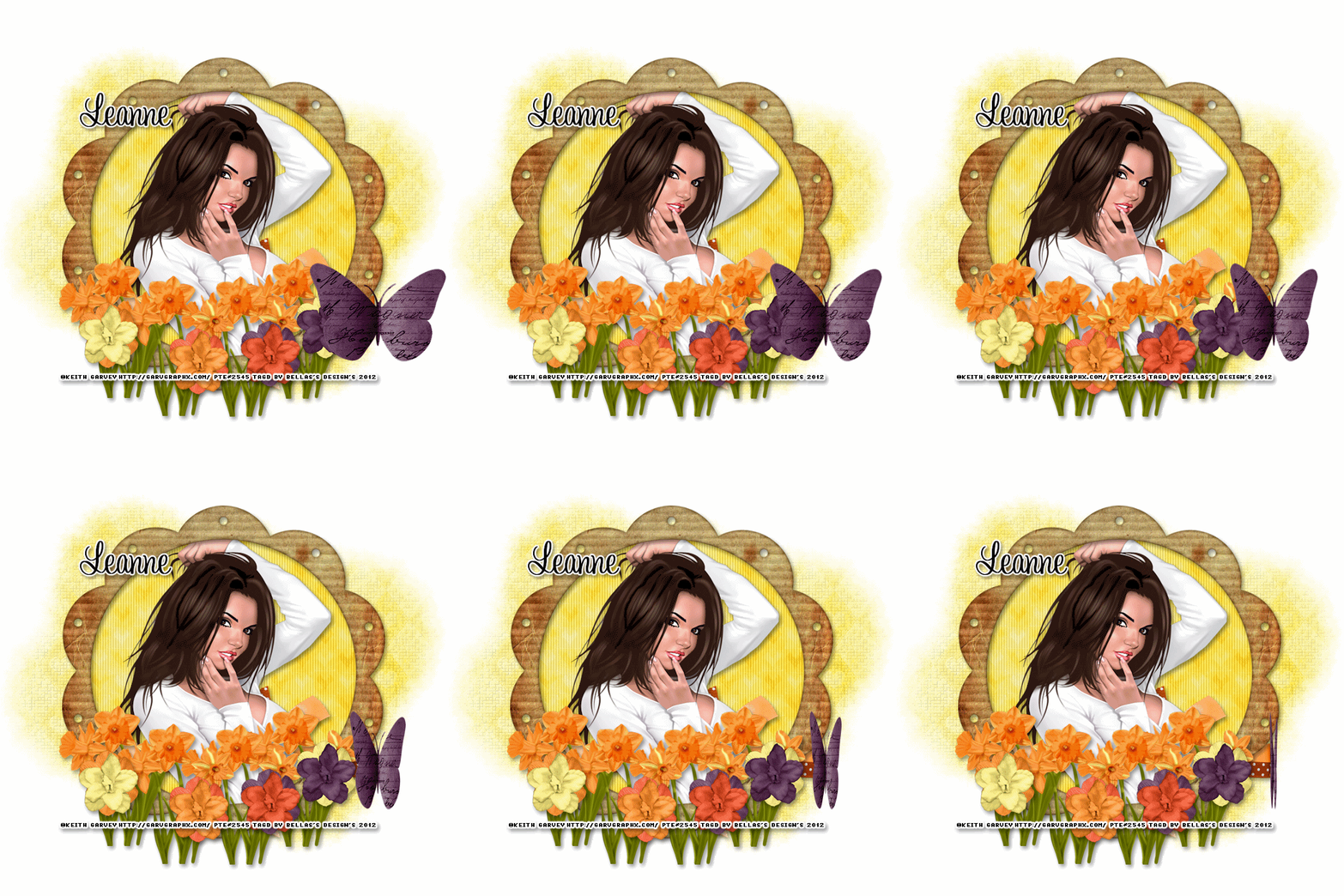
Scrapkit of choice. I used a PTU kit by DesignedByStina Called EveningSunset at purchased here
I used the artwork of Keith Garvey You have to be licensed to use this artwork and it can be purchased here
Plug-ins used:
Lokas Software - 3D Shadow
EyeCandy4000- gradient glow
photoeffex-scanlines
Anmations Shop
Open a new canvas 700x700 Transparent
1.Open up your DBS_Frame10 copy and paste as new layer resize 80%,take your magic wand click inside modify expand by 5 add new layer flood with DBS_Paper08,apply photoeffex-scanlines with these settings, 2,2,20,10,2,2 vertical toggle checked,
Give your frame layer Apply Lokas 3D Shadow with settings at B35, T60, Angles X,Y, and Z at 0, zoom 100, Offset X-Y by 5, Perspective at 35 color black
2.Open up your DBS_Wrap03 copy and paste as new layer resize 60% move down close to your bottom of your frame,Apply Lokas 3D Shadow with settings at B35, T60, Angles X,Y, and Z at 0, zoom 100, Offset X-Y by 5, Perspective at 35 color black
4.Open up your Tube Copy and paste as new layer resize 80% sharpen then duplicate then Gaussian Blur 2 then change blend mode to soft light.merge down, then changle blend mode to normal
5.Open up your DBS_Daffodils02 copy and paste as new layer resize 60% the Duplicates 4 times Merge down,Resize 50%, Duplicates Image Mirror,Apply Lokas 3D Shadow with settings at B35, T60, Angles X,Y, and Z at 0, zoom 100, Offset X-Y by 5, Perspective at 35 color black
6.Open up all your Flowers01,02,03,04 copy and paste as new layer resize 40%x2 Merge down,Apply Lokas 3D Shadow with settings at B35, T60, Angles X,Y, and Z at 0, zoom 100, Offset X-Y by 5, Perspective at 35 color black
7.Add your copyright info and your watermark/logo
8.I hope you enjoyed my tutorial and come visit again real soon!
9.Open Animation Shop Edit Paste As New Animation
10.Edit Duplicate Selected.Repeat Duplicate Selected 4 more times.You should have 17 frames
11.Go Back into PSP.Open DBS_PaperButterfly01.Image Resize.Resize by 60%x2, Smart Size, Resize all layers unchecked.Adjust Sharpness Sharpen.Edit Copy.
12.Back into Animation Shop.Edit Paste As New Animation
13.Effects Insert Image Effect, with these settings Animation Frame checked effects length:4.0secs,Frames per second 4fps Effects Compress
14.Edit > Select All.Edit Copy.On your main canvas Edit Select All.Edit Paste Into Selected Frame.Place the butterfly at the top of your image, or to your liking.
save and we're done
Monday, 19 March 2012
♥Summer Dream♥

Scrapkit of choice: I used a PTU kit by Lise-Lotte Sunesen Called LongingForSummerFS you can get here
I used the artwork of JenniferJanesko You have to be licensed to use this artwork and it can be purchased here
Plug-ins used:
Lokas Software - 3D Shadow
EyeCandy4000- gradient glow
Xero - Porcelain and Fritillary
photoeffex-scanlines
Template by Denz Designs template60 you can get here
Open up your template in psp
Duplicates (Shift+D) And Close out the original.
Delete Following: Wordart and Denz Designz
1.Click on your square back select all float defloat add new layer flood with lhsPAPER_kitLongingForSummer_10,apply Xero-Fritillary with these setting 5,30,25,9,Apply Lokas 3D Shadow with settings at B35, T60, Angles X,Y, and Z at 0, zoom 100, Offset X-Y by 5, Perspective at 35 color black.
2.Click on your circle dots select all float and defloat add new layer flood with lhsPAPER_kitLongingForSummer_4,Apply Lokas 3D Shadow with settings at B35, T60, Angles X,Y, and Z at 0, zoom 100, Offset X-Y by 5, Perspective at 35 color black.
3.Click on your strips dots select all float and defloat add new layer flood with lhsPAPER_kitLongingForSummer_8,Apply photoeffex-scanlines with these settings:2,2,20,10,2,0, vertical togger unchecked,Apply Lokas 3D Shadow with settings at B35, T60, Angles X,Y, and Z at 0, zoom 100, Offset X-Y by 5, Perspective at 35 color black.
4.Click on your Stars select all float defloat add new layer flood with lhsPAPER_kitLongingForSummer_10,apply Xero-Fritillary with these setting 5,30,25,9,Apply Lokas 3D Shadow with settings at B35, T60, Angles X,Y, and Z at 0, zoom 100, Offset X-Y by 5, Perspective at 35 color black.
5.Click on your Diamond shape select all float defloat add new layer flood with lhsPAPER_kitLongingForSummer_7,Apply Lokas 3D Shadow with settings at B35, T60, Angles X,Y, and Z at 0, zoom 100, Offset X-Y by 5, Perspective at 35 color black.
6.Click on your circle back select all float defloat add new layer flood with lhsPAPER_kitLongingForSummer_7,apply Xero-Fritillary with these setting 5,30,25,9,Apply Lokas 3D Shadow with settings at B35, T60, Angles X,Y, and Z at 0, zoom 100, Offset X-Y by 5, Perspective at 35 color black.
7.Click on your Circle Frame select all float defloat add new layer flood with lhsPAPER_kitLongingForSummer_10,apply Xero-Fritillary with these setting 5,30,25,9,Apply Lokas 3D Shadow with settings at B35, T60, Angles X,Y, and Z at 0, zoom 100, Offset X-Y by 5, Perspective at 35 color black.
8.Open up your Tube copy and paste as new layer selections invert delete on keybroad,apply Xero Porcelain with settings at 50, 120, 140, 122, 47 and 96
9.Open up your lhsLEAF_kitLongingForSummer_01 copy and paste as new layer resize 50% Duplicates Image Mirror,Image Flip,Apply Lokas 3D Shadow with settings at B35, T60, Angles X,Y, and Z at 0, zoom 100, Offset X-Y by 5, Perspective at 35 color black
10.Open up your lhsLEAF_kitLongingForSummer_02 copy and paste as new layer resize 50% Duplicates Image Mirror,Image Flip,Apply Lokas 3D Shadow with settings at B35, T60, Angles X,Y, and Z at 0, zoom 100, Offset X-Y by 5, Perspective at 35 color black
11.Open up your lhsOWL_kitLongingForSummer_02 copy and paste as new layer resize 40%x2 Duplicates,Apply Lokas 3D Shadow with settings at B35, T60, Angles X,Y, and Z at 0, zoom 100, Offset X-Y by 5, Perspective at 35 color black
12.Open up your lhsLADYBUG_kitLongingForSummer_01 copy and paste as new layer resize 40%,Apply Lokas 3D Shadow with settings at B35, T60, Angles X,Y, and Z at 0, zoom 100, Offset X-Y by 5, Perspective at 35 color black
Add your copyright info and your watermark/logo
I hope you enjoyed my tutorial and come visit again real soon!
Sunday, 18 March 2012
♥LastSummer♥

Scrapkit of choice. I used a PTU kit by
Digicats (and Dogs)
Called JustBeachy can get hereused the artwork of Elias Chatzoudis You have to be licensed to use this artwork and it can be purchased here
Plug-ins needed:
Lokas Software - 3D Shadow
Xero - Fritillary
EyeCandy4000- gradient glow
Open a new canvas 800x600 Transparent
1.Open up your DCD_JB_Frame05 copy and paste as new layer then Image Rotate to right resize 80%,Take your Magic wand click inside modify expand by 5,add new layer flood with DCD_JB_Paper14,Apply Xero:fritillary with these setting,6,20,19,21, keep selection copy and paste your Image ,Apply Xero:fritillary with these setting,6,20,19,21,,Apply Lokas 3D Shadow with settings at B35, T60, Angles X,Y, and Z at 0, zoom 100, Offset X-Y by 5, Perspective at 35 color black
2.Open up your Tube copy and paste as new layer resize 60% move under your frame layer and Change Blend mode to Luminance (legacy). Duplicate Image Mirror move Duplicates to frame layer change Blend mode to normal,,Apply Lokas 3D Shadow with settings at B35, T60, Angles X,Y, and Z at 0, zoom 100, Offset X-Y by 5, Perspective at 35 color black
3.Open up your DCD_JB_Sand copy and paste as new layer sent to bottom,,Apply Lokas 3D Shadow with settings at B35, T60, Angles X,Y, and Z at 0, zoom 100, Offset X-Y by 5, Perspective at 35 color black
4.Open up your DCD_JB_Pebbles copy and paste as new layer resize 50% sent bottom on top your sand,,Apply Lokas 3D Shadow with settings at B35, T60, Angles X,Y, and Z at 0, zoom 100, Offset X-Y by 5, Perspective at 35 color black
5.Open up your DCD_JB_Flower Border copy and paste asn new layer resize 50% Duplicates Image Mirror, Merge Down Duplicates Image to right,Apply Lokas 3D Shadow with settings at B35, T60, Angles X,Y, and Z at 0, zoom 100, Offset X-Y by 5, Perspective at 35 color black
6.Open up your DCD_JB_Gecko02 copy and paste as new layer resize 40%,Apply Lokas 3D Shadow with settings at B35, T60, Angles X,Y, and Z at 0, zoom 100, Offset X-Y by 5, Perspective at 35 color black
7.Open up your DCD_JB_Glitter copy and paste as new later Duplicate,Image Mirror,Apply Lokas 3D Shadow with settings at B35, T60, Angles X,Y, and Z at 0, zoom 100, Offset X-Y by 5, Perspective at 35 color black
8.Apply your mask
Add your copyright info and your watermark/logo
I hope you enjoyed my tutorial and come visit again real soon!
Friday, 16 March 2012
♥MyIrishLuck♥

Scrapkit of choice. I used a FTU kit by Creative Scraps by Crys Called Irish Luck can get here
used the artwork of Elias Chatzoudis You have to be licensed to use this artwork and it can be purchased here
Plug-ins needed:
Lokas Software - 3D Shadow
Xero - Fritillary
EyeCandy4000- gradient glow
Anmations Shop
Anytag template will work :)
Open up your template in psp
Duplicates (Shift+D) And Close out the original
Delete following:© layer
1.Open up your IL_Frame_1 Image Rotate to left, copy and paste as new layer *refer mine tag*take your magic wand modify expand by 5 add new layer flood with your IL_Paper_2
2.Click inside one frames open up your tube copy and paste as new layer, selections Invert delete on keybroad, do same untill you have 3 frames with tube in each,under frame layer,Then for each tube, sharpen then duplicate then Gaussian Blur 2 then change blend mode to soft light.
3.Click on your Raster3 select all float defloat add new layer flood with your IL_Paper_2 ,Apply Gradient Glow fat white line
4.Click on your Raster4 select all float defloat add new layer flood with your IL_Paper_2,Apply Xero:fritillary with these setting,5,55,11,17
5.Open up your Tube Copy and paste as new layer resize 90% sharpen then duplicate then Gaussian Blur 2 then change blend mode to soft light.
6.Click on your raster2 select all float delfoat add new layer flood with your IL_Paper_2,Apply Xero:fritillary with these setting,5,55,11,17,Apply Gradient Glow fat white line
7.Open up your IL_Element_17 copy and paste as new layer duplicates Image Mirror,Merge down,Sharpen,Apply Lokas 3D Shadow with settings at B35, T60, Angles X,Y, and Z at 0, zoom 100, Offset X-Y by 5, Perspective at 35 color black
8.Open up your IL_Element_19,copy and paste as new layer duplicates Image Mirror,Merge down,Sharpen,Apply Lokas 3D Shadow with settings at B35, T60, Angles X,Y, and Z at 0, zoom 100, Offset X-Y by 5, Perspective at 35 color black
9.Open up your IL_Element_36 copy and paste as new layer resize 40% duplicates Image Mirror,Merge down,Sharpen,Apply Lokas 3D Shadow with settings at B35, T60, Angles X,Y, and Z at 0, zoom 100, Offset X-Y by 5, Perspective at 35 color black
10.Take your Text tool and Words: My Irish Luck
Add your copyright info and your watermark/logo
I hope you enjoyed my tutorial and come visit again real soon!
~*~Ready for Anmations Shop~*~
Go back IL_Element_36 Copy merged. Open up Animation Shop. Paste as a new animation in AS. Back in PSP.
go to Edit > Undo Constellation. Apply Xenofex Constellation again but hit the random seed button.
Copy merged and paste after the first frame in AS.
Repeat the above stop one more time
so you have a total of 3 frames. Select all frames (CTRL+A) Change the frame properties to 13.
♥Spring Spirit ♥

Scrapkit of choice: I used a FTU kit by Bluedream Designs Called Spring Spirit you can get here
I used the artwork of Suzanne Woolcott You have to be licensed to use this artwork and it can be purchased here
Plug-ins used:
Lokas Software - 3D Shadow
EyeCandy4000- gradient glow
xero:fritillary
Open a new canvas 700x700 Transparent
1.Open up your BD-Sping Spirit-Frame1 copy and paste as new layer resize 80% take your magic wand click inside by by 5 add new flood with BD-Spring Spirit-Paper4, Apply Xero:fritillary with these setting,5,55,11,17,Apply Lokas 3D Shadow with settings at B35, T60, Angles X,Y, and Z at 0, zoom 100, Offset X-Y by 5, Perspective at 35 color black
2.Open up your BVS leaves spring spirit copy and paste as new layer resize 40% Duplucates 6 times Place them bottom of your frame Merge down,Apply Lokas 3D Shadow with settings at B35, T60, Angles X,Y, and Z at 0, zoom 100, Offset X-Y by 5, Perspective at 35 color black
3.Open up your BVS flower 01 spring spirit copy and paste as new layer resize 50% Duplicates 3 times,Apply Lokas 3D Shadow with settings at B35, T60, Angles X,Y, and Z at 0, zoom 100, Offset X-Y by 5, Perspective at 35 color black
4.Open up your BVS flower 02 spring spirit copy and paste as new layer resize 50% Duplicates 2 times,Apply Lokas 3D Shadow with settings at B35, T60, Angles X,Y, and Z at 0, zoom 100, Offset X-Y by 5, Perspective at 35 color black
Open up your tube copy and paste as new layer resize 80%,Apply Lokas 3D Shadow with settings at B35, T60, Angles X,Y, and Z at 0, zoom 100, Offset X-Y by 5, Perspective at 35 color black
Take your Text tool written The world favorite season is the spring, apply gradient glow Diffuse,Apply Lokas 3D Shadow with settings at B35, T60, Angles X,Y, and Z at 0, zoom 100, Offset X-Y by 5, Perspective at 35 color black
Apply your Mask,
Add your copyright info and your watermark/logo
I hope you enjoyed my tutorial and come visit again real soon!
Wednesday, 14 March 2012
♥Spring Dream♥

This tutorial was written by me on March 14, 2012. Any resemblance to any other tutorial is pure coincidence. Please DO NOT claim this tutorial as your own or post it to any other blog or website without permission from me. It was written for PSP X, but should be compatible with any version of PSP. I wrote it assuming that you have a working knowledge of PSP and it's components
Scrapkit of choice: I used a PTU kit by Tootypup Scraps Called Spring Dream buy it at Scrap Wishes
I used the artwork of Suzanne Woolcott You have to be licensed to use this artwork and it can be purchased here
Plug-ins used:
Lokas Software - 3D Shadow
EyeCandy4000- gradient glow
xero:fritillary
Template by BeckyCreations Tag Template 140 you can get here
Open up your template in psp
Duplicates (Shift+D) And Close out the original.
Delete Following:delete the info layer and all shadow layersand Put and pinuptoons and Bars back and bar and 2 hearts
Canvas size 700x700 Resize all layers by 110%
1.Click on your Black Rectangle Select all float defloat add new layer flood with #fff7af,Apply Xero:fritillary with these setting,5,55,11,17,
2.Open up your TP_Grass_01 copy and paste as new layer resize 50% Duplicates Image Mirror, Merge Down,Sharpen
3.Click on your Background Select all float defloat add new layer flood with #ddb657,Apply Xero:fritillary with these setting,5,55,11,17,
4.Click on your Circlebg Select all float defloat add new layer flood with #ddb657,Apply Xero:fritillary with these setting,5,55,11,17,
5.Click on your Circle Select all float defloat add new layer flood with #fff7af,Apply Xero:fritillary with these setting,5,55,11,17,
6.Open up your TP_FlowerVine_05 copy and paste as new layer resize 50% Duplicates Image Mirror,Duplicates Image Flip,Apply Lokas 3D Shadow with settings at B35, T60, Angles X,Y, and Z at 0, zoom 100, Offset X-Y by 5, Perspective at 35 color black
7.Open up your TP_FlowerVine_03 copy and paste as new layer resize 50% Duplicates Image Mirror,Duplicates Image Flip,Take your Eraser Tool and eraser what hang from your vine,Apply Lokas 3D Shadow with settings at B35, T60, Angles X,Y, and Z at 0, zoom 100, Offset X-Y by 5, Perspective at 35 color black
8.Open up your TP_FlowerVine_02 Image Rotate to left copy and paste as new layer resize 60% Duplicates ,Apply Lokas 3D Shadow with settings at B35, T60, Angles X,Y, and Z at 0, zoom 100, Offset X-Y by 5, Perspective at 35 color black
9.Open up your TP_EasterBasket_04 copy and paste as new layer resize 60%, Duplicates Image Mirror,Apply Lokas 3D Shadow with settings at B35, T60, Angles X,Y, and Z at 0, zoom 100, Offset X-Y by 5, Perspective at 35 color black
10. Open up your tube copy and paste as new layer,Apply Lokas 3D Shadow with settings at B35, T60, Angles X,Y, and Z at 0, zoom 100, Offset X-Y by 5, Perspective at 35 color black
11.take your Text tool and put spring dream
Add your copyright info and your watermark/logo
I hope you enjoyed my tutorial and come visit again real soon!
Tuesday, 13 March 2012
♥Here Come Autumn♥

Scrapkit of choice. I used a PTU kit by Darkmoon's Dream Called FlirtingWithFall buy it at Scrappin Dollars
I used the artwork of Molly Harrison You have to be licensed to use this artwork and it can be purchased
Plug-ins used:
Lokas Software - 3D Shadow
EyeCandy4000- gradient glow
Xero: Fritillary
Template by Freebie Friends Scraps And More . by Tracy.F Designz -AutumnTemplate4. can be downloaded here
Open up your template in psp
Duplicates (Shift+D) And Close out the original.
Delete Following:Tracy.F Designz, ribbow,text
Canvas size 700x700
1.Click on your circle select all float defloat add new Layer flood with #724b2b ,Apply Xero:fritillary with these setting,5,55,11,17,
2.Click on your circle border select all float defloat add new Layer flood with #5a0c26,,Apply Xero:fritillary with these setting,5,55,11,17,Graient glow white fat line
3.Click on your strips select all float defloat add new Layer flood with #5a0c26,,Apply Xero:fritillary with these setting,5,55,11,17,Graient glow white fat line
4.Open up your tube copy and paste as new layer resize 90%,Apply Lokas 3D Shadow with settings at B35, T60, Angles X,Y, and Z at 0, zoom 100, Offset X-Y by 5, Perspective at 35 color black
5.Open up your Flowers copy and paste them as new layer Duplicate Image Mirror,merge down,Apply Lokas 3D Shadow with settings at B35, T60, Angles X,Y, and Z at 0, zoom 100, Offset X-Y by 5, Perspective at 35 color black
6.Open up your deco01 copy and paste them as new layer Duplicate Image Mirror,merge down,Apply Lokas 3D Shadow with settings at B35, T60, Angles X,Y, and Z at 0, zoom 100, Offset X-Y by 5, Perspective at 35 color black
7.Open up your fence copy and paste them as new layer Duplicate Image Mirror,merge down,Apply Lokas 3D Shadow with settings at B35, T60, Angles X,Y, and Z at 0, zoom 100, Offset X-Y by 5, Perspective at 35 color black
8.Go Back To Your Flowers Layers Duplucates bring down bottom of your tube, select all float defloat Edit Cut
9.
♥New things cooming soon♥
Keep look out for new tuts with out scrapkits and ptu too, I am think more doing my own scrapkits again but i am not really know that yet or not, because i don't want drama in my life
♥Spring In The Air♥

Scrapkit of choice. I used a PTU kit by HF-Projekte Called Steampunk Spring Time buy it at Inspirations Of Scrap Friends
I used the artwork of PinupToon You have to be licensed to use this artwork and it can be purchased here
Plug-ins used:Lokas Software - 3D Shadow
EyeCandy4000- gradient glow
xero:Porcelain
photoeffex-scanlines
Template by WitchysHeart Tag Template #11 you can get here
Open up your template in psp
Duplicates (Shift+D) And Close out the original.
Delete Following:Tou,Skullright and Skull left and all dotten lines
Canvas size 700x700
1.Open up your PHF_SST6 copy and paste as new layer resize smart 40% Duplicate Image Mirror,Then Duplicates Image Flip,Apply Lokas 3D Shadow with settings at B35, T60, Angles X,Y, and Z at 0, zoom 100, Offset X-Y by 5, Perspective at 35 color black
2.Click on your bottom black bar select all float and defloat add new layer flood with #9b7c2a,apply photoeffex-scanlines with these settings, 2,2,20,10,2,2 vertical toggle unchecked,Apply Lokas 3D Shadow with settings at B35, T60, Angles X,Y, and Z at 0, zoom 100, Offset X-Y by 5, Perspective at 35 color black
3.Click on your Top black bar select all float and defloat add new layer flood with #9b7c2a,apply photoeffex-scanlines with these settings, 2,2,20,10,2,2 vertical toggle unchecked,Apply Lokas 3D Shadow with settings at B35, T60, Angles X,Y, and Z at 0, zoom 100, Offset X-Y by 5, Perspective at 35 color black
4.Click on your Pink Retangle left Select all float defloat add new layer flood with #d4e0b8,apply photoeffex-scanlines with these settings, 2,2,20,10,2,2 vertical toggle unchecked,Apply Lokas 3D Shadow with settings at B35, T60, Angles X,Y, and Z at 0, zoom 100, Offset X-Y by 5, Perspective at 35 color black
5.Click on your Pink Retangle Right Select all float defloat add new layer flood with #d4e0b8,apply photoeffex-scanlines with these settings, 2,2,20,10,2,2 vertical toggle unchecked,Apply Lokas 3D Shadow with settings at B35, T60, Angles X,Y, and Z at 0, zoom 100, Offset X-Y by 5, Perspective at 35 color black
6.Click on your Black Retangle middle Select all float defloat add new layer flood with #d4e0b8,apply photoeffex-scanlines with these settings, 2,2,20,10,2,2 vertical toggle unchecked,Apply Lokas 3D Shadow with settings at B35, T60, Angles X,Y, and Z at 0, zoom 100, Offset X-Y by 5, Perspective at 35 color black
7.Click on your Black Rectangle Left select all float defloat add new layer flood with #e4deae,apply photoeffex-scanlines with these settings, 2,2,20,10,2,2 vertical toggle unchecked,Apply Lokas 3D Shadow with settings at B35, T60, Angles X,Y, and Z at 0, zoom 100, Offset X-Y by 5, Perspective at 35 color black
8.Click on your Black Rectangle right select all float defloat add new layer flood with #e4deae,apply photoeffex-scanlines with these settings, 2,2,20,10,2,2 vertical toggle unchecked,Apply Lokas 3D Shadow with settings at B35, T60, Angles X,Y, and Z at 0, zoom 100, Offset X-Y by 5, Perspective at 35 color black
9.Click on your Pink Rectangle Left select all float defloat add new layer flood with #e4deae,apply photoeffex-scanlines with these settings, 2,2,20,10,2,2 vertical toggle unchecked,Apply Lokas 3D Shadow with settings at B35, T60, Angles X,Y, and Z at 0, zoom 100, Offset X-Y by 5, Perspective at 35 color black
10.Open up your tube copy and paste as new layer Apply Lokas 3D Shadow with settings at B35, T60, Angles X,Y, and Z at 0, zoom 100, Offset X-Y by 5, Perspective at 35 color black
11.Open up your PHF_SST3 copy and paste as new layer resize 40% smart size,Apply Lokas 3D Shadow with settings at B35, T60, Angles X,Y, and Z at 0, zoom 100, Offset X-Y by 5, Perspective at 35 color black
12.Open up your PHF_SST5 copy and paste as new layer resize 60% Smart size,Apply Lokas 3D Shadow with settings at B35, T60, Angles X,Y, and Z at 0, zoom 100, Offset X-Y by 5, Perspective at 35 color black
13.Open up your PHF_SST24 copy and paste as new layer resize 50%
14.Close off background and butterfly and marge down, apply xero porcelain with these setting 50,128,128,0,255,0, open up your background and butterfly layers,
Take your Text tool and write Spring in The Air
Add your copyright info and your watermark/logo
I hope you enjoyed my tutorial and come visit again real soon!
Monday, 12 March 2012
♥Puddle Of Love♥
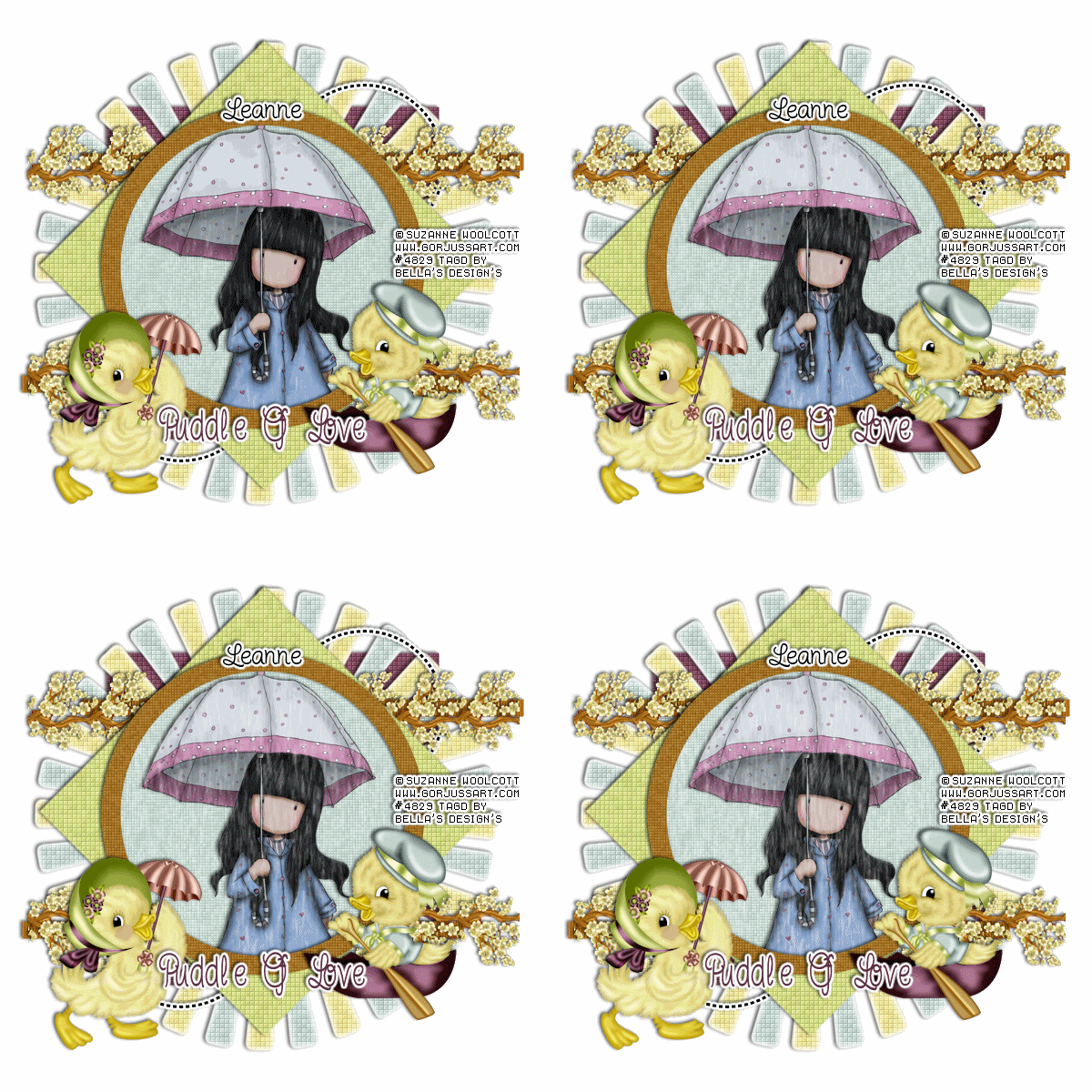
Scrapkit of choice. I used a PTU kit by Butterfly Kisses Scraps Called A Sunny Ducky Day, buy it at Whimsical Divas
I used the artwork of Suzanne Woolcott You have to be licensed to use this artwork and it can be purchased here
Plug-ins used:
Lokas Software - 3D Shadow
EyeCandy4000- gradient glow
xero: Fritillary
Mura - Meister Copie
VDL Adrenaline-Snowflakes
Template by Denz Designs template60 you can get here
Open up your template in psp
Duplicates (Shift+D) And Close out the original.
Delete Following:Stars Super Star and Denz Designz
1.Click on your Square back select all float and defloat add new layer flood #824b60 with apply Xero-Fritillary with these setting 5,30,25,9,Apply Lokas 3D Shadow with settings at B35, T60, Angles X,Y, and Z at 0, zoom 100, Offset X-Y by 5, Perspective at 35 color black
2.Open up your Sun copy and paste as new layer apply Xero: Fritillary with these settings: 5,30,25,9, Apply gradient Glow with these settings Fat White Line.Apply Lokas 3D Shadow with settings at B35, T60, Angles X,Y, and Z at 0, zoom 100, Offset X-Y by 5, Perspective at 35 color black
3.Click on your Dotted Circles Apply gradient Glow with these settings Fat White Line.Apply Lokas 3D Shadow with settings at B35, T60, Angles X,Y, and Z at 0, zoom 100, Offset X-Y by 5, Perspective at 35 color black
4.Click on your Strips Select all float defloat add new layer flood with #b06e18 Apply photoeffex-scanlines with these settings:1,2,20,10,0,0, vertical togger checked, Apply Lokas 3D Shadow with settings at B35, T60, Angles X,Y, and Z at 0, zoom 100, Offset X-Y by 5, Perspective at 35 color black.
5.Open up your Branch01 copy and paste as new layer resize 20% , Mura - Meister Copie with these settings Line,Wraparound Behind, Duplicates Image Flip , Merge Down Resize 90%,Apply Lokas 3D Shadow with settings at B35, T60, Angles X,Y, and Z at 0, zoom 100, Offset X-Y by 5, Perspective at 35 color black
6.Click on your Diamond Shape select all float and defloat add new layer flood with #d0dd85,apply Xero: Fritillary with these settings: 5,30,25,9, .Apply Lokas 3D Shadow with settings at B35, T60, Angles X,Y, and Z at 0, zoom 100, Offset X-Y by 5, Perspective at 35 color black
7.Click on your Circle Back select all float defloat add new layer flood with apply Xero: Fritillary with these settings: 5,30,15,9,
8.Open up your tube copy and paste as new layer selections invert delete
9.Click on your circle frame select all float and defloat add new layer flood with #a57529 apply Xero: Fritillary with these settings: 3,30,15,9, .Apply Lokas 3D Shadow with settings at B35, T60, Angles X,Y, and Z at 0, zoom 100, Offset X-Y by 5, Perspective at 35 color black
10.Open up your Duckie01 & Duckie02 copy and paste as new layer resize 40% Apply Lokas 3D Shadow with settings at B35, T60, Angles X,Y, and Z at 0, zoom 100, Offset X-Y by 5, Perspective at 35 color black
11.Take your Text And Write out Puddle Of Love
Go Back To your Circle Back Select all float defloat Click on your laste raster and Apply Snowflake with these settings 98,0,15,48,0,Color White Below and add 3 raster and On first blank layer, click Effects-Plugins-VDL Adrenaline-Snowflakes and use these settings: Next blank up, Snowflakes again and only change the random to 8, next blank up Snowflakes again and only change random to 12,
next blank up Snowflakes again and change random to 16. Keep selected. On first snow layer, click Adjust-Blur-Motion Blur with these settings: Angle 0, Strength 24.Next layer up blur again and change strength to 28, Next layer up blur again and change strength to 32, Next layer up blur again and change strength to 36.
Deselect. Close off visibility of top 3 snowflake layers.
Add your copyright info and your watermark/logo
Your layer palette should have all of the tag visible with only one animated layer showing,
the other ones should have red Xs showing they are not visible.
Click Edit-Copy Merged, go into Animation Shop and click Edit-Paste-As New Animation.
Then back in PSP, close visibility on the first animated layer and open visibility on the next animated layer,
again Click Edit-Copy Merged, then go into Animation Shop and right click on the image you just pasted there and
choose Paste-After Current Frame. Repeat this for each animated layer and making sure each time in Animation Shop that you paste the new copy after the last frame
of the image there
Save as a .gif image
I hope you enjoyed my tutorial and come visit again real soon!
Sunday, 11 March 2012
♥OceanDreams♥

Scrapkit of choice. I used a PTU kit by Creative Scraps by Crys Called By the Sea can be purchased here
I used the artwork of Elias Chatzoudis You have to be licensed to use this artwork and it can be purchased here
Plug-ins needed:
Lokas Software - 3D Shadow
Xero - Fritillary
My supplies :(includes my template and My Sand) you can get here
Open up your template in psp
Duplicates (Shift+D) And Close out the original.
Delete Following:
1.Click on your Raster3 select all float and defloat, add new layer flood with #76bad5 Selections modify contract by 4 add new layer flood with #c5e8f6,add/remove noise add noise with these setting Gaussian Monochrome Noise 25%, add a drop shadow of choice
2.Open up your BTS_element_68 copy and paste as new layer Resize 60% Duplicates Image Mirror, Merge down,Apply Lokas 3D Shadow with settings at B35, T60, Angles X,Y, and Z at 0, zoom 100, Offset X-Y by 5, Perspective at 35 color black
3.Click on your Raster4 select all float and defloat, add new layer flood with #76bad5 Selections modify contract by 4 add new layer flood with #c5e8f6,add/remove noise add noise with these setting Gaussian Monochrome Noise 25%, add a drop shadow of choice
4.Open up your BTS_element_71 copy and paste as new layer resize 80% Duplicates Image Mirror,Merge Down Apply Lokas 3D Shadow with settings at B35, T60, Angles X,Y, and Z at 0, zoom 100, Offset X-Y by 5, Perspective at 35 color black
5.Open up your Supplies, BD_Sand copy and paste as new layer Duplicates Image Mirror,Merge Down,Apply Lokas 3D Shadow with settings at B35, T60, Angles X,Y, and Z at 0, zoom 100, Offset X-Y by 5, Perspective at 35 color black
Open up your BTS_Frame_7 copy and paste as new layer resize 80% Apply Lokas 3D Shadow with settings at B35, T60, Angles X,Y, and Z at 0, zoom 100, Offset X-Y by 5, Perspective at 35 color black
7.Click on your Raster 5 select all float defloat add new layer flood with #abdef2,apply photoeffex-scanlines with these settings, 2,2,20,10,2,0 vertical toggle checked,
8.Click on your Copy of Raster 5 select all float defloat add new layer flood with #abdef2,apply photoeffex-scanlines with these settings, 2,2,20,10,2,0 vertical toggle checked,
9.Click on your raster6 select all float and defloat add new layer flood with #d5eef8,apply Xero - Fritillary with these settings at 5, 30, 25, and 9.
10.Click on your Copy of Raster6 select all float and defloat add new layer flood with #d5eef8,apply Xero - Fritillary with these settings at 5, 30, 25, and 9.
11.Open up your BTS_element_69 copy and paste as new layer resize 50% Duplicates, Image Mirror,Apply Lokas 3D Shadow with settings at B35, T60, Angles X,Y, and Z at 0, zoom 100, Offset X-Y by 5, Perspective at 35 color black
12.Open up your Tube Copy and paste as new layer resize 80%,Apply Lokas 3D Shadow with settings at B35, T60, Angles X,Y, and Z at 0, zoom 100, Offset X-Y by 5, Perspective at 35 color black,
13.Open up your BTS_element_55 copy and paste as new layer resize 50% Duplucates Image Mirror,Apply Lokas 3D Shadow with settings at B35, T60, Angles X,Y, and Z at 0, zoom 100, Offset X-Y by 5, Perspective at 35 color black,
15.Open up your BTS_elements_61&BTS_elements_57 copy and paste as new layer resize 50%x2 Apply Lokas 3D Shadow with settings at B35, T60, Angles X,Y, and Z at 0, zoom 100, Offset X-Y by 5, Perspective at 35 color black,
Add your copyright info and your watermark/logo
I hope you enjoyed my tutorial and come visit again real soon!

Thursday, 8 March 2012
♥OceanBlue♥

Scrapkit of choice. I used a PTU kit by Gina's Gems Scraps Called Ocean Blue buy it at Inspirations Of Scrap Friends
I used the artwork of Dave Nestler You have to be licensed to use this artwork and it can be purchased here
Plug-ins used:
Lokas Software - 3D Shadow
EyeCandy4000- gradient glow
xero: Fritillary And Porcelain
Mura - Meister Copie
VDL Adrenaline-Snowflakes
Template by Freebie Friends Scraps And More . by Tracy.F Designz -AutumnTemplate4. can be downloaded here
Open up your template in psp.
Duplicates (Shift+D) And Close out the original.
Delete Following credit layer.Ribbon,dotted rectangle,Text Dotted Circle2
Canvas size 700x700 resize all layers by 120%
1.Click on your Strips Select all float And defloat add new layer flood with paper 22 copy and paste into selections Apply apply Xero: Fritillary with these settings: 5,30,10,0, Apply gradient Glow with these settings Fat White Line.Apply Lokas 3D Shadow with settings at B35, T60, Angles X,Y, and Z at 0, zoom 100, Offset X-Y by 5, Perspective at 35 color black
2.Click on your circle select all float And defloat add new layer flood with paper 1 copy and paste into selections
3.Open up your Tube Copy and paste as new layer Apply Lokas 3D Shadow with settings at B35, T60, Angles X,Y, and Z at 0, zoom 100, Offset X-Y by 5, Perspective at 35 color black,apply Xero Porcelain with settings at 50, 120, 140, 122, 47 and 96
4.Click on your Dotted Circle1 Apply Gradient Glow Fat White Line
5.Click On your Circle Frame Select all float and defloat add new layer flood with paper22 copy and paste into selections Apply 3 D Inner Bevel With these settings:Bevel#2, Width:31 Smoothness and Ambience and Shininess:0 Depth:1,Apply Lokas 3D Shadow with settings at B35, T60, Angles X,Y, and Z at 0, zoom 100, Offset X-Y by 5, Perspective at 35 color black
6.Open up your GGS_Ocean Blue_Voile Flower 1 copy and paste as new layer resize 40% Apply Mura's Filter Meister Copies With these settings:Encircle,22,62,62 rest stay same., Apply Gradient Glow Fat White Line,Apply Lokas 3D Shadow with settings at B35, T60, Angles X,Y, and Z at 0, zoom 100, Offset X-Y by 5, Perspective at 35 color black
7.Open up your 2 GGS_OceanBlue_Word Art copy and paste as new layer resize 30% Gradient Glow Fat white line,Apply Lokas 3D Shadow with settings at B35, T60, Angles X,Y, and Z at 0, zoom 100, Offset X-Y by 5, Perspective at 35 color black
8.Open up your GGS_Ocean Blue_Stacked Sea Shells Copy and paste as new layer resize 30% Duplucates Image Mirror, Apply Lokas 3D Shadow with settings at B35, T60, Angles X,Y, and Z at 0, zoom 100, Offset X-Y by 5, Perspective at 35 color black
9.Open Up your GGS_Ocean Blue_Cluster 2 copy and paste as new layer resize 50% Duplicates Image Mirror,Apply Lokas 3D Shadow with settings at B35, T60, Angles X,Y, and Z at 0, zoom 100, Offset X-Y by 5, Perspective at 35 color black
Click on your laste raster and Apply Snowflake with these settings Below and add 3 raster and On first blank layer, click Effects-Plugins-VDL Adrenaline-Snowflakes and use these settings: Next blank up, Snowflakes again and only change the random to 8, next blank up Snowflakes again and only change random to 12,
next blank up Snowflakes again and change random to 16. Keep selected. On first snow layer, click Adjust-Blur-Motion Blur with these settings: Angle 0, Strength 24.Next layer up blur again and change strength to 28, Next layer up blur again and change strength to 32, Next layer up blur again and change strength to 36.
Deselect. Close off visibility of top 3 snowflake layers.
10.Add your copyright info and your watermark/logo
~*~*~Open animation~*~*~
Your layer palette should have all of the tag visible with only one animated layer showing, the other ones should have red Xs
showing they are not visible. Click Edit-Copy Merged, go into Animation Shop and click Edit-Paste-As New Animation. Then back in PSP,
close visibility on the first animated layer and open visibility on the next animated layer, again Click Edit-Copy
Merged, then go into Animation Shop and right click on the image you just pasted there and choose Paste-After Current Frame. Repeat this for each animated layer and making sure each time in Animation Shop that you paste the new copy after the last frame of the image there
Monday, 5 March 2012
♥ScabbyChic-BeautifulCountryGirl ♥

Scrapkit of choice. I used a PTU kit by Butterfly Kisses Scraps Called Shabby chic at purchased here
I used the artwork of Keith Garvey You have to be licensed to use this artwork and it can be purchased here
Template by Becky's Creations. Template 106 can be downloaded here
Plug-ins needed:
Lokas Software - 3D Shadow
EyeCandy4000- gradient glow
Xero - Porcelain
Xero - Fritillary
1.Click on your Frame fill select all float and defloat add new layer flood with #b54a5e apply xero fritillary with these setting 3,30,10,17, then apply it again same setting
2.Keep selection open up your tube copy and paste as new layer selections invert delete on keybroad, Apply Lokas 3D Shadow with settings at B35, T60, Angles X,Y, and Z at 0, zoom 100, Offset X-Y by 5, Perspective at 35 color black.
apply xero porcelain with these setting 50,128,128,0,255,0
3.Click on your Frame select all float and defloat add new layer flood with #a9916f Adjust add/remove noise add noise with these setting Uniform Monochrome checked and Noise 100% Apply Again,Apply Lokas 3D Shadow with settings at B35, T60, Angles X,Y, and Z at 0, zoom 100, Offset X-Y by 5, Perspective at 35 color black.
4.Open up your flower2 copy and paste as new layer resize 20% then apply Mura's Filter Meister Copies with these setting Spiral -Circle Tile(mode) Behind, Resize 60% Duplicates Image Mirror,Apply gradient glow Fat white Line, Apply Lokas 3D Shadow with settings at B35, T60, Angles X,Y, and Z at 0, zoom 100, Offset X-Y by 5, Perspective at 35 color black.
5.Click on your Rectangle1 select all float and defloat add new layer flood with #b54a5e apply xero fritillary with these setting 3,30,10,17, then apply it again same setting
6.Click on your rectangle1 background select all float and defloat add new layer flood with #a9916f Adjust add/remove noise add noise with these setting Uniform Monochrome checked and Noise 100% Apply Again,Apply Lokas 3D Shadow with settings at B35, T60, Angles X,Y, and Z at 0, zoom 100, Offset X-Y by 5, Perspective at 35 color black.
7.Click on your Circle select all float and defloat add new layer flood with #b54a5e apply xero fritillary with these setting 3,30,10,17, then apply it again same setting
8.Click on your circle scallop select all float and defloat add new layer flood with #a9916f Adjust add/remove noise add noise with these setting Uniform Monochrome checked and Noise 100% Apply Again,Apply Lokas 3D Shadow with settings at B35, T60, Angles X,Y, and Z at 0, zoom 100, Offset X-Y by 5, Perspective at 35 color black.
9.Click on your Rectangle1 select all float and defloat add new layer flood with #b54a5e apply xero fritillary with these setting 3,30,10,17, then apply it again same setting
10.Click on your rectangle scallop select all float and defloat add new layer flood with #a9916f Adjust add/remove noise add noise with these setting Uniform Monochrome checked and Noise 100% Apply Again,Apply Lokas 3D Shadow with settings at B35, T60, Angles X,Y, and Z at 0, zoom 100, Offset X-Y by 5, Perspective at 35 color black.
11.Open up your Ribbon Copy and paste as new layer resize 30% Duplicate Image Mirror, Merge Down, Duplicate Image Flip.Apply Lokas 3D Shadow with settings at B35, T60, Angles X,Y, and Z at 0, zoom 100, Offset X-Y by 5, Perspective at 35 color black.
12.Open up your paperbutterfly copy and paste as new layer resize 25% Apply Lokas 3D Shadow with settings at B35, T60, Angles X,Y, and Z at 0, zoom 100, Offset X-Y by 5, Perspective at 35 color black.
13.Take your Text Tool and Written Scabby Chic Beauitful Country Girl, Apply gradient glow Fat White Line ,Apply Lokas 3D Shadow with settings at B35, T60, Angles X,Y, and Z at 0, zoom 100, Offset X-Y by 5, Perspective at 35 color black.
Add your copyright info and your watermark/logo
I hope you enjoyed my tutorial and come visit again real soon!
Subscribe to:
Posts (Atom)